Showing posts with label apple. Show all posts

2017-11-06

I do not fear Kerberos, but I do fear Apple Itunes billing

I laugh at Kerberos messages. When I see a stack trace with a meaningless network error I go "that's interesting". I even learned PowerShell in a morning to fix where I'd managed to break our Windows build and tests.

But there is now one piece of software I do not ever want to approach, ever again. Apple icloud billing.

So far, since Saturday's warnings on my phone telling me that there was a billing problem
  1. Tried and repeatedly failed to update my card details
  2. Had my VISA card seemingly blocked by my bank,
  3. Been locked out of our Netflix subscription on account of them failing to bill a card which has been locked out by my may
  4. Had a chat line with someone on Apple online, who finally told me to phone an 800 number.
  5. Who are closed until office hours tomorrow
What am I trying to do? Set up iCloud family storage so I get a full resolution copy of my pics shared across devices, also give the other two members of our household lots of storage.

What have I achieved? Apart from a card lockout and loss of Netflix, nothing.

If this was a work problem I'd be loading debug level log files oftens of GB in editors, using regexps to delete all lines of noise, then trying to work backwards from the first stack trace in one process to where something in another system went awry. Not here though here I'm thinking "I don't need this". So if I don't get this sorted out by the end of the week, I won't be. I will have been defeated.

Last month I opted to pay £7/month for 2TB of iCloud storage. This not only looked great value for 2TB of storage, the fact I could share it with the rest of the family meant that we got a very good deal for all that data. And, with integration with iphotos, I could use to upload all my full resolution pictures. So sign up I did

My card is actually bonded to Bina's account, but here I set up the storage, had to reenter it. Where the fact that the dropdown menu switched to finnish was most amusing

finnish

With hindsight I should have taken "billing setup page cannot maintain consistency of locales between UI, known region of user, and menus" as a warning sign that something was broken.

Other than that, everything seemed to work. Photo upload working well. I don't yet keep my full photoset managed by iPhotos; it's long been a partitionedBy(year, month) directory tree built up with the now unmaintained Picasa, backed up at full res to our home server, at lower res to google photos. The iCloud experience seemed to be going smoothly; smoothly enough to think about the logistics of a full photo import. One factor there iCloud photos downloader works great as a way of downloading the full res images into the year/month layout, so I can pull images over to the server, so giving me backup and exit strategies.

That was on the Friday. On the Saturday a little alert pops up on the phone, matched by an email
Apple "we will take away all your photos"

Something has gone wrong. Well, no problem, over to billing. First, the phone UI. A couple of attempts and no, no joy. Over to the web page

Ths time, the menus are in german

appleID can't handle payment updates

"Something didn't work but we don't know what". Nice. Again? Same message.

Never mind, I recognise "PayPal" in german, lets try that:
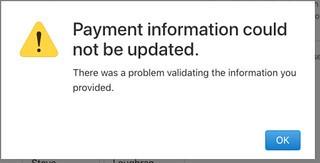
And they can't handle paypal
No: failure.

Next attempt: use my Visa credit card, not the bank debit card I normally use. This *appears* to take. At least, I haven't got any more emails, and the photos haven't been deleted. All well to the limits of my observability.

Except, guess what ends up in my inbox instead? Netflix complaining about billing
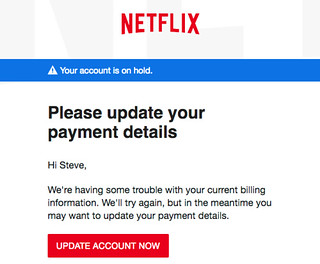
Netflix "there was a problem"
Hypothesis: repeated failures of apple billing to set things up have caused the bank to lock down the card, it just so happens that Netflix bill the same day (does everyone do the first few days of each month?), and so: blocked off. That is, Apple Billing's issues are sufficient to break Netflix.

Over to the bank, review transactions, drop them a note.

My bank is fairly secure and uses 2FA with a chip-and-pin card inserted into a portable card reader. You can log in without it, but then cannot set up transfers to any new destination. I normally use the card reader and card. Not today though, signatures aren't being accepted. Solution, fall back to the "secrets" and then compose a message

Except of course, the first time I try that, it fails

And I can't talk to my bank about it

This is not a good day. Why can't I just have "Unknown failure at GSS API level". That I can handle. Instead what I am seeing here is a cross-service outage choreographed by Apple, which, if it really does take away my photos, will even go into my devices.

Solution: log out, log in. Compose the message in a text editor for ease of resubmission. Paste and submit. Off it goes.

Sunday: don't go near a computer. Phone still got a red marker "billing issues", though I can't distinguish from "old billing issues" from new billing issues. That is: no email to say things are fixed. At the same time, no emails to say "things are still broken". Same from netflix, neither a success message, or a failure one. Nothing from the bank either.

Monday: not worrying about this while working. No Kerberos errors there either. Today is a good day, apart from the thermostat on the ground floor not sending "turn the heating" on messages to the boiler, even after swapping the batteries.

After dinner, netflix. Except the TV has been logged out. Log in to netflix on the web and yes, my card is still not valid. Go to the bank, no response there yet. Go back to netflix, insert Visa credit card: its happy. This is good, as if this card started failing too, I'd be running out of functional payment mechanisms.

Now, what about apple?
apple id payment method; chrome
No, not english, or indeed, any language I know how to read. What now?

Apple support, in the form of a chat
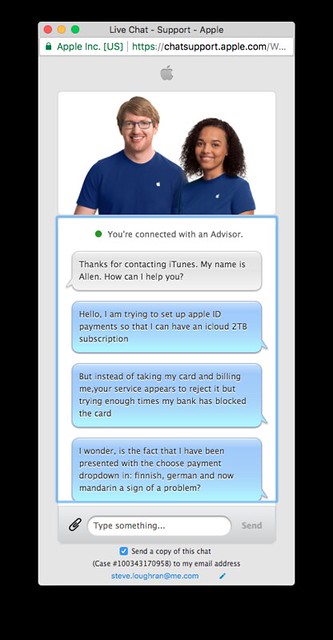
Screen Shot 2017-11-06 at 21.10.51
After a couple of minutes wait I as talking to someone. I was a bit worried that the person I'm talking to was "allen". I know Allen. Sometimes he's helpful. Let's see.

After explaining my problem and sharing my appleId, Allen had a solution immediately: only the nominated owner of the family account can do the payment, even if the icloud storage account is in the name of another. So log in as them and try and sort stuff out there.

So: log out as me, long in as B., edit the billing. Which is the same card I've been using. Somehow, things went so wrong with Amazon billing trying to charge the system off my user ID and failing that I've been blocked everywhere. Solution: over to the VISA credit card. All "seems" well.

But how can I be sure? I've not got any emails from Apple Billing. The little alert in the settings window is gone, but I don't trust it. Without notification from Apple confirming that all is well, I have to assume that things are utterly broken. How can I trust a billing system which has managed to lock me out of my banking or netflix?

I raised this topic with Allen. After a bit of backwards and forwards, he gave me an 800 number to call. Which I did. They are closed after 19:00 hours, so I'll have to wait until tomorrow. I shall be calling them. I shall also be in touch with my bank.

Overall: this has been, so far, an utter disaster. Its not just that the system suffers from broken details (prompts in random languages), and deeply broken back ends (whose card is charged), but it manages to escalate the problem to transitively block out other parts of my online life.

If everything works tomorrow, I'll treat this as a transient disaster. If, on the other hand, things are not working tomorrow, I'm going to give up trying to maintain an iCloud storage account. I'll come up with some other solution. I just can't face having the billing system destroy the rest of my life.

2016-09-30

s/macOS Sierra/r/macOS vista/

I've been using macOS sierra for about ten/eleven days now. and I've rebooted my laptop about 6+ times because the system was broken.

Two recurrent problems: failure to wake in the morning, gradual lockup of finder and transitive app failure.

Failure to wake: I go up to the laptop, hit the keyboard and mouse, nothing happens. Only way to fix: hold down the power and wait for a hard restart.

Back in 1999 I worked on a project with HP's laptop group, where we instrumented a set of colleague's laptops with a simple data collection app, then collected a few months of data. At the time this was considered "a lot of data". The result, the paper: The Secret Life of Notebooks. This showed that people tended to have a limited set of contexts, where context was defined as system setup: power, display, IP addr, and application: mail, ppt. And that people were so predictable in their use models, that doing some HMM to predict contexts wouldn't have been hard.

I ended up writing some little app which essentially did that: based on IPAddr and app (PPT, Acroread) full screen, could choose: power policy, network proxy options, sound settings (mute in meetings, etc). It was fairly popular amongst colleagues, because it would turn proxy stuff on and off for you, and know to turn off display timeouts when giving presentations; crank up the savings when on the move. When I look at Windows 8+ adaptation to network settings, or OSX's equivalent of that and the "When on battery ...", I see the same ideas. You don't get any HMM on the laptops though; for that you have to pick up an android phone and look at Google Now, something which really is trying to understand you and your habits. And, because it can read your emails, correlate those habits with emailed plans. If it really wanted to be innovative/scary it would work out who you were associated with (family, friends, colleagues, fellow students...) and use their actions to predict yours. Maybe someday.

User-wise, another interesting feature was how people viewed mail so differently when online vs offline. Offline, you'd see this workflow of outlook-> word-> outlook-> ppt-> outlook-> acroread-> outlook, ... etc, very fast cycles. It seemed uncontrolled window tabbing at first —until you realise it's peple going through attachments. Online, and people's workflow pulled in IE (it was a long time ago), and you'd get a cycle where IE was the most popular app cycled to from outlook. Email was already so full of links that the notion of reading email "offline" was dying. You could do it, but your workflow would be crippled. And that was 15+ years ago. Nowadays things would only be worse.

There was a second paper which was internal, plus circulated/presented to Microsoft. There I looked at system uptime, and especially the common sequence in the log

1998-08-23 18:15 event: hibernate
1998-08-24 09:00 event: boot

or

1998-09-01 11:20 event: suspend
1998-09-01 11:30 event: boot

That is: a lot of the time the laptop through it was going to sleep, it was really crashing.

My theory was that alongside the official ACPI sleep states S1-S5 there was actually a secret state S6, "the sleep you never awake from". Some more research showed that it was generally on startup that the process failed, and it was strongly correlated with external state changes: networks, power, monitors. It wasn't that the laptop made a mess of suspending, it was that when it came back up it couldn't cope with the changed state.

I don't know if macOS sierra has that issue: I do know that it has that problem if left attached to an external display overnight. Looking in the system logs, you can see powernap wakeups regularly (that's all displays off), but come the first user interaction event —where the displays are meant to kick off— they don't come up. This is resulting in system logs not far off from the '99 experiment

2016-09-27 22:20 powerd: suspend
2016-09-27 23:00 powerd: powernap wake
  ....

2016-09-27 23:30 powerd: powernap wake
..

2016-09-28 00:30 powerd: powernap wake
..
2016-09-28 08:30 powerd: powernap wake
..
1998-09-01 09:30 event: boot


That last one: that's me trying to use it.

I've turned off powernap to see if that makes a difference there.

That's the nightly problem. What's happened 3+ times is the lockup of Finder, with a gradual degradation of other applications as they go near its services.

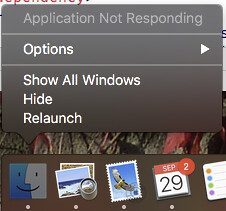
First finder goes, and restarts do nothing
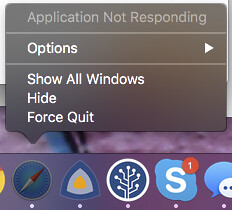
Finder not responding
Then the other apps fail, usually when you go near the filesytem dialogs, or the photo collection.
Safari not responding
As with finder, restart does nothing.

If it was my own code, I'd assume a lock is being acquired in the kernel on some filesystem resource and never being released. This is why locks should always have leases. Root cause of that lock/release problem? Who knows. I can't help wondering, though, if its related to all the new icloud sync feature, as that's the biggest filesystem change. I've also noticed that I usually have a USB stick plugged in; I'm going to go without that to see if it helps.

When i get this slow failure, i don't rush to reboot. It takes about 10 minutes to get my dev environment back up and running again: the IDEs, the terminal windows, etc, 2FA signing in to webapps, etc. I really don't want to have to do it. Instead I end up with bits of the UI keeling over, while I stick to the IDE, chrome, terminals. I had a bit of problem on Thursday evening when calendar locked up the extent I couldn't get the URLs for some conf calls; I had to use the phone to get the links and type them in.

Anyway, come the evening, after the conf calls and some S3a Scale tests, I kick off a shutdown.

And here a flaw of the OSX UI comes in: it assumes that whatever reason you are trying to do a shutdown for, it is not because finder has crashed. And it gives any application the right to veto the shutdown. You can't just select "shut down..." on the menu, you have to wait for any apps to block it, stop them and then continue. And even after doing all of that, I come in this morning and find the laptop, fans spinning away, me logged out but some dialog box about keychain access required. This is not shutting down, this is half hearted attempt at maybe shutting down sometimes if your OS hasn't got into a mess.

It's notable that Windows has some hard coded assumptions that a shutdown is caused by the failure of something. It also has, from the world of Windows Server, the concept that the user may not be waiting at the console waiting to click OK dialogs popped up by apps. Thus it has a harsher workflow.

  1. A WM_QUERYENDSESSION message comes out saying "we'd like to shut down, is that OK? Apps get the opportunity to veto the sesson end, but not if it's tagged as a critical shutdown. And of you don't service that event, you are considered dead and don't get a veto.
  2. The WM_ENDSESSION event sent to apps to say "you really are going down —get over it".
  3. There is a registry entry WaitToKillAppTimeout you can use to control how long the OS waits for applications and to terminate, WaitToKillServiceTimeout for services, and even HungAppTimeout to control how long an app has to respond to an exit menu request (WM_EXIT?) before being considered dead and so killed.
See? Microsoft know that things hang, that even services can hang, and that if you want to shut down then you want to shut down, not find out 12 hours later that it had stopped with a dialog box.

In contrast macOS Sierra has implicit assumptions that apps rarely hang, the OS services never deadlock, and that shutting down is a rare activity where you are happy to wait for all the applications to interact with you —even the ones that have stopped responding.

This may have held for for OS/X, but for macOS all those assumptions are invalid. And that makes shutdown far more painful and unreliable than it need be.

Now if you go low level and do a "man shutdown", you can see that a similar escalation process is built in there

Upon shutdown, all running processes are sent a SIGTERM followed by a SIGKILL.  The SIGKILL will follow the SIGTERM by an intentionally indeterminate period of time.  Programs are expected to take only enough time to flush all dirty data and exit.  Developers are encouraged to file a bug with the OS vendor, should they encounter an issue with this functionality.

I think from now on, it'll be a shutdown command from the console.

Anyway, because of all these problems, I do currently regret installing macOS sierra. It shipped to meet a deadline, rather than because it was ready.

macOS Sierra is not ready for use unless you are prepared to reboot every day, and are aware that the only way to reboot reliably is from the console.

2015-07-17

iOS 8.4, the windows vista of ipad

I like to listen to music while coding, with my normal strategy being "on a monday, pick an artist, leave them playing all week". It's a low-effort policy. Except iOS 8.4 has ruined my workflow.

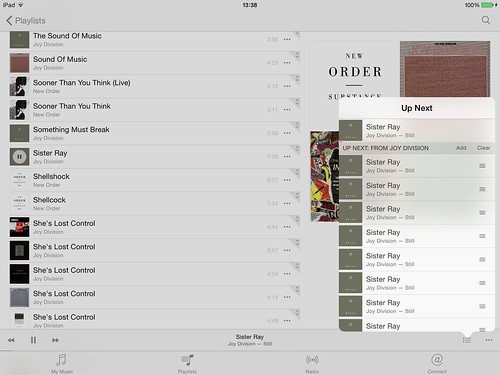
iOS 8.4 music player getting playlists broken by building a sequence of the single file in the list

Now while I think Ian Curtis's version of Sister Ray is possibly better than the Velvet Underground's, it doesn't mean I want to listen to it completely, yet this is precisely what it appears to want to do. Both when I start the playlist, and sometimes even when it's been happily mixing the playlist. Sometimes it just gets into a state where the next (shuffled) track is the same as the current track, forever. And before anyone says "hey, you just hit the repeat-per-track option", here's the fun bit: it switched from repeat playlist to repeat track, all on its own. That implies a state change, either in some local variable (how?) or that the app is persisting state and reloading it, and that persist/reload changed the value. As a developer, I suspect the latter, as it's easier to get a save/restore of an enum wrong.

The new UI doesn't help. Apparently using Siri helps, as you can just say "shuffle" and let it do the rest. I couldn't get that far. Because every time I asked it to play my music, it warns me that this will break the up next list. That's the one that's decided my entire playlist consists of one MP3, Sister Ray covered by Joy Division.


If one thing is clear:not only is the UI of iOS 8.4 music a retrograde step, it was shipped without enough testing, or with major known bugs. I don't know which is worse.

Siri (and Cortana, OK google and Alexa) are all showing how speech recognition has improved over time, and we are starting to see more AI-hard applications running in mobile devices (google translate on Android is another classic) —but it's moot if the applications that the speech recognitions systems are hooked up to are broken.

Which is poignant, isn't it:
  • Cutting edge speech recognition software combining mobile devices & remote server-side processing: working
  • Music player application of a kind which even Apple have been shipping for over a decade, and which AMP and Napster had nailed down earlier: broken.
The usual tactic: rebooting? All the playlists are gone, even after a couple of attempts at resyncing with itunes.

That's in then: I cannot use the Apple music app on the iPad to listen to my music. Which given that a key strategic justification for the 8.4 release is the Apple Music service, has to be a complete disaster.


This reminds me so much of the windows Vista experience: an upgrade that was a downgrade. I had vista on a laptop for a week before sticking linux on. I don't have that option here, only the promise that iOS 9 will make things "better"


I would go back to the ipod nano, except I can't find the cable for that, so have switched to google play and streaming my in-cloud music backup. Which, from an apple strategic perspective, can't rate very highly, not if I am the only person abandoning the music player for alternatives that actually work.

2013-10-26

Maverick and Applications

Untitled

One action this week was a full OS/X roll on three boxes; fairly event free. The main feature for me is "better multiscreen support". There's also now an OS/X version of Linux's Powertop; as with powertop is more of a developer "your app is killing the battery" than something end users can actually do anything with -other than complain.

The other big change is to Safari, but as I don't use that, it's moot.

The fact that its a free upgrade is interesting -and with Safari being a centrepiece of that upgrade, maybe the goal of the upgrade is to accelerate adoption of the latest Safari and stop people using Firefox & Chrome. The more market share in browsers you have, the more web sites work in it -and as Safari is only used on a macs, it can't have more desktop browser market share than the market share apple have in the PC business itself. A better Safari could maximise that market share -while its emphasis on integration with iPads and iPhones rewards people who live in the single-vendor-device space, making us owners of Android phones feeling left out.

One offering that did get headlines was "Free iWork", but that turns out to be "Free on new systems"; if you have an existing OS/X box, you get to pay $20 or so per app -same as before.

Except, if you go to the apple app store, the reviews of the new suite from existing users are pretty negative: dumbed down to the point where users with existing spreadsheets, documents and presentations are finding things missing -where in keynote a lot of the fancy "make your presentations look impressive" features are gone.

They're not going to come back, now that iWork is a freebie.

If the NRE costs of maintaining iWork are now part of the cost of the Mac -and OS upgrades are going the same way. Even if apple maintain market share and ASP margins over Windows PCs, the software stack costs have just gone up.

Which means those applications have gone from "premium applications with revenue through the app store", with a business plan of "be compelling enough to sell new copies as well as regular upgrades from out existing customer base", to "bundled stuff to justify the premium cost of our machines".

That's a big difference, and I don't see it being a driver for the iWork suite being enhanced with features more compelling to the experts.

Where apple are likely to go is cross-device and apple cloud integration, again to reward the faithful single-vendor customers. Indeed, you do get the free apple iCloud versions of the iWork apps, which look nice on Safari -obviously. Apple's business model there: upsell storage, does depend on storage demand, but the harsh truth is, it needs a lot of documents to use up the 4GB of free storage. Photographs, now, they do take up space, which clearly explains why the new iPhoto has put work in iPhoto to iCloud sharing. Yet it does still retain Flickr sharing, which, with 1TB of storage, must be a competitor to iCloud for public photos, while facebook remains a destination for private pics.

I wonder whether that Flickr uploader will still be there the next time Apple push out a free update to the OS and applications
 
[photo: a line of Tuk Tuks, Tanzania/Kenya Border]

2013-04-09

Software updates are the bane of VMs -and Flash is its prophet

It's the first tuesday of the month, so it's Flash update time. Three critical patches, where "critical" means "if you don't update it your computer will belong to someone else"

Adobe Flash Install Screen

These flash updates are the bane of my life. I have to update the three physical machinesin the house, and with two of them used by family members, I can't ignore updating any of them.

The workflow for flash updates is
  1. Open Settings manager, find the flash panel, start that, get it to check for an update.
  2. If there is one, it brings up the "a new update is available, would you like to install it"? dialog.
  3. Flash Control Panel opens up firefox with a download page: start that download.
  4. Close down Firefox
  5. Close down Chrome
  6. Close down the Flash Control Panel (if still present)
  7. Close down the settings manager
  8. Find the flash .dmg file in ~/Downloads
  9. open it
  10. click on the installer
  11. follow its dialog
  12. eject the mounted .dmg image
  13. restart your browsers. This is always a good time to look for Firefox updates too, then check if it recommends any other browser updates.
  14. For all gmail logins, the two-level auth.
That's a repeat 3x operation, with the extra homework that on a multi-login machine, I have to "sudo killall firefox && sudo killall chrome" the other user's browser instances to make sure that the update has propagated (the installer doesn't block if these are running, as it doesn't look for them).

Then comes the VMs. Two windows boxes stripped down to the minimum: no flash, no MSOffice, or Firefox, but Chrome and IE.  IE setup to only trust adobe.com, microsoft.com and the windows update, where trust is "allow installed AX controls".

Manual updates there too, with the MS patch also potentially forcing restarts.

This show the price of VMs: every VM needs to be kept up to date. The no. of VMs I have to update is not O(PCs), it is O(PCs)*(1+O(VMs/PC)

Most of the VMs are on my machine, one Linux VM for native code builds, other VMs for openstack, more for a local LinuxHA cluster

There it is simpler, "yum -y update && shutdown -h0" or the same for "apt-get -update".

Which shows why Linux makes the best OS for my VMs. It's not so much the cost, or the experience, but the near-zero-effort update-everything operation. 

It also show's where Apples "app-store" mind view is limited. Because new App-store apps must be sandboxed and save all state to their (mediocre) Cloud, there's no way for the Appstore to update browsers or the plugins integrated with them. Which leaves two outcomes
  1. Someone needs to go to each mac and go through steps 1-14 above.
  2. They don't get updated, and end up being 0wned.
It's easy to fault Apple here, but it really reflects a world view that we have for software in general, "out of band security updates are so unlikely we don't need to make it easy". Once we switch to assuming that there may be an emergency patch any day of the week, we start thinking "how would I do this as a background task" -which is something all of us need to consider.

2013-03-18

Defeated by iPad synchronization options

Last January I got an iPad mini as a travel accessory to the laptop: music, eBooks, PDF formatted papers, online and offline maps, etc.

CCTV on Gloucester Road

It's also intended to be holder of travel paperwork: the schedule, logistics notes, eTickets, hotel details. All mostly PDF, though my KLM check in has just emailed a GIF QF barcode which apparently will get me through security (outbound I'm testing w/ a backup paper one, return: commit to GIF).
CCTV on Gloucester Road
A major use case of mine then is: get PDFs off my laptop and into the iPad so that I can bring them up and view them.

Which is where it all seems to go horribly wrong.

I can see four different synchronization options.

iTunes
Copy into the books section of iTunes and let them trickle over via USB or wifi.
this works, provided the devices can see each other in the same wifi subnet.

It is a bit clunky as I have to drag and drop content from my folder of travel bits (e.g. 2013-03-AMS) and store them in a flat pool of documents, where they end up mixed next to things like Grinstead and Cell's Introduction to Probability, papers on things like Chubby, and copies of Singletrack Magazine. This isn't ideal for navigating at the airport security gate.

But again: it works, and I know how to verify that the stuff has trickled over -you look at the sync status page.

Workflow
  1. Clean up the last trips' documents.
  2. Copy in the new files
  3. Force a sync to make sure it is over.
  4. Updates: steps 2 and 3.
Gloucester Road Art

Apple iCloud

This is meant to be the future. Instead of saving to the filesystem, you save it to "the cloud" where it will magically make its way over to your other devices.

Except I put PDFs in there and there doesn't seem to be any obvious way to actually see that they have made it over, let alone open it.

This is not a Cloud, it is /dev/null with unrealistic promises. I could say that if I copy a file to /dev/null then all my other devices will get the same view of the copied documents -but if they aren't there, it's not a very good view.

The workflow for getting documents over via iCloud is therefore
  1. Save the files into iCloud.
  2. Pick one of the other synchronization options to get your content over.

45 rpm on Gloucester Road

Dropbox

The folder metaphor, I can drag and drop anything in on my desktop to it, it trickles over across all my desktops, OS/X and linux.

What it doesn't do is automatically trickle the files over to the iPad. It copies the directory metadata over, but I seem to have to tap every file -by hand- for it to decide that it's going to download every artifact in the filesystem.

For anyone with a default 2 GB Dropbox account, you could copy everything over while on wifi and not use up any device space, even for customers like me who went for the low-end 16GB model because they felt the cost/GB of extra SSD in an iPad was utterly excessive.

The workflow to sync is therefore
  1. Save all the content into a dropbox managed folder 
  2. go to the tablet and find that folder
  3. go to every file in it, and manually hit the download button, wait for it to D/L. Repeat for all files in a process that is O(files)*O(filesize).
  4. The update process is steps 1-3, repeated.
Warnings

Box
I also have a box account, and an iPad app for that. This has some flags about auto-syncing on wifi only, which I'm happy with, not having a device with a modem in (tethering & wifi usually suffice).

It also has -and this got me excited- the ability to mark folders as "favorite", where it is claimed that content will auto-sync to the pad. I was hopeful here, marked my folder travel as fave and then put stuff into trip-specific subdirs underneath, for this week's trip, next month's US trip, and others.

I go over to the 'pad, expecting the files to be there.

Only they aren't, because the favoured bit is not recursive.

Once you know that, Box sync becomes manageable
  1. Create a folder for each planned trip.
  2. Copy travel docs in there.
  3. Go to your table, and mark that folder as favourite, even if the parent dir is already marked as such.
  4. Update the travel folder on the laptop -things will now trickle over.
Remember step #3 and it does work.
CCTV on Gloucester Road

Email
Just mail them to yourself the day before you travel, download the mail and make sure the files are there.

This appears to work, though there are probably limits on how big the files are that are auto-D/L'd, and the files go away at the history rate specified in the mail app, which is no good for a long trip.

Workflow
  1. Make sure the mail app is set to cache data for >= the length of your trip.
  2. Email the PDFs to yourself.
  3. Verify in the mail app that they have all arrived.
The nice feature about this is that it works from everywhere, whether or not box is installed. You can also get other people to contribute to the document pool by having them email you direct.

There you have it: ways I've tried to sync documents.

CCTV on Gloucester Road

If iCloud actually seemed to do what is promised "share your content across devices via Apple's cloud" then it might work, even if it's metaphor "not a filesystem, but a place where every artefact is permanently bonded to whichever application put it there, even if there is >1 text or PDF viewer on a device", is so dumbed down it represents a step back to Mac 1.0.

Unfortunately the behaviour I see "the same consistency and durability model as copying files to /dev/null", means that there is no way I would trust it with anything. I actually hope there may be something obvious I'm missing here, as I can't understand how something so dire would spring into existence, and don't believe the business plan "make money from premium users who want to store more stuff" stands a chance against tools that actually work.

Instead I've settled on Box, making sure that things go over (opening a non-random sample of them -I should toss a coin over each file for better randomness.

Oh, and print out my boarding card and the map from the train station to the hotel.

[Photos: some of the CCTVs I saw on a single walk down Gloucester Road. I'm not quite sure what problems this high street had that needed near-ubiquitous CCTV coverage, but there's enough cameras to have fixed it. I like the one pointed straight at the ATM the best]